
What it is
The Owner can cancel the subscription at any time. Cancelling takes effect right away:
- the subscription stops, so nothing more is charged;
- the workspace is paused: nobody on your team can use it, and Aria stops answering customers;
- your data is kept: contacts, conversations, settings and everything else stay as they were.
Renew any time to pick up where you left off. You can also ask for a refund when you cancel.
How to use it
- Open Settings → Billing and select Cancel subscription.
- Read what happens. Tick the box if you also want to ask for a refund; the amount is shown first.
- Confirm. The workspace is paused straight away.
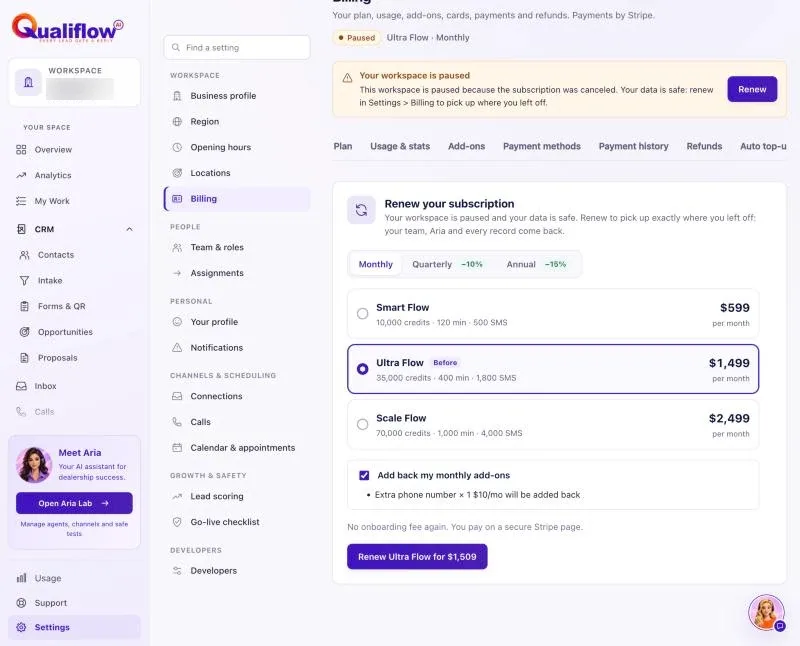
- To renew, sign in, open Settings → Billing and select Renew. Choose a plan and period and pay. No onboarding fee is charged again.
- You can also ask Nora to cancel or ask for a refund. Her card shows what happens, and nothing changes until you select Confirm.
What the data means
While paused, every screen says "This workspace is paused because the subscription was canceled. Your data is safe: renew in Settings > Billing to pick up where you left off." You can still sign in, open Settings → Billing, read notifications and ask Nora.
After renewing, everything opens again with the same data and settings, and the monthly allowances start fresh from the renewal day.
Possible issues and fixes
My team can't open anything
Symptom: Every page shows the paused message.
Why: The subscription was cancelled, so the workspace is paused.
Fix: The Owner renews in Settings → Billing.
How to check: After the payment, the app opens normally.
I cancelled by mistake
Symptom: The workspace is paused and you didn't mean to cancel.
Why: Cancelling takes effect right away.
Fix: Renew straight away in Settings → Billing. Your data is all there.
How to check: Settings → Billing shows your plan as Active.
