
What it is
Phone numbers (in Settings → Connections → SMS & calls) lists the numbers your dealership uses. "Add the phone numbers this dealership uses and choose which location's Inbox each one feeds."
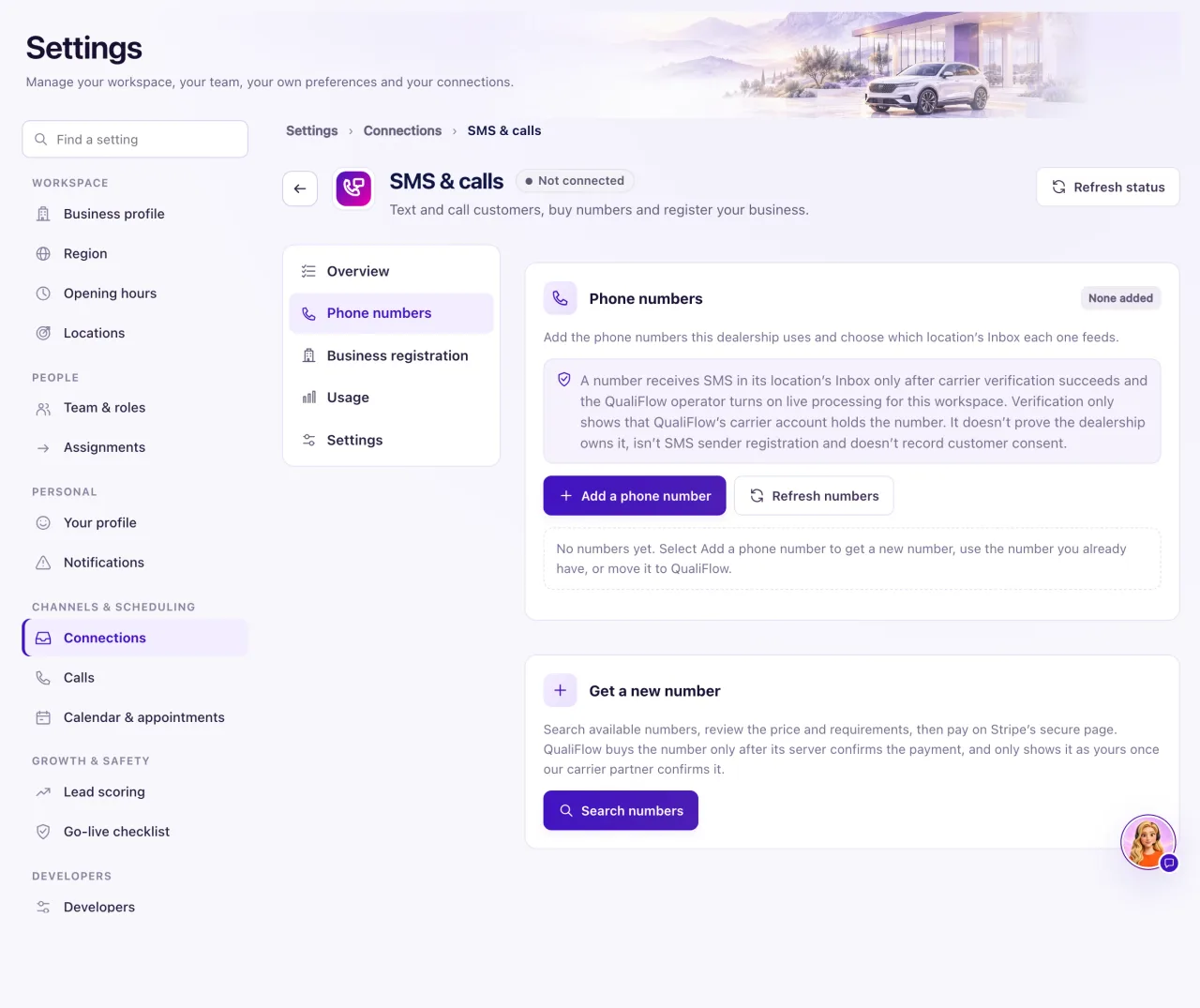
Every plan includes 1 free number; each extra number is $10/month (see "Phone numbers on your plan"). Your first number is free: you pick it and QualiFlow gets it straight away, with no payment page. Internal workspaces never pay. For an extra number you pay $10 for the first month on Stripe's secure page. Numbers QualiFlow assigns to your workspace appear in the list by themselves, already verified and answered by Aria; there's nothing to add for those, and Owners get an alert. To keep a number you already have, see "Use your existing number".
How to use it
- Open Settings → Connections → SMS & calls and choose Phone numbers.
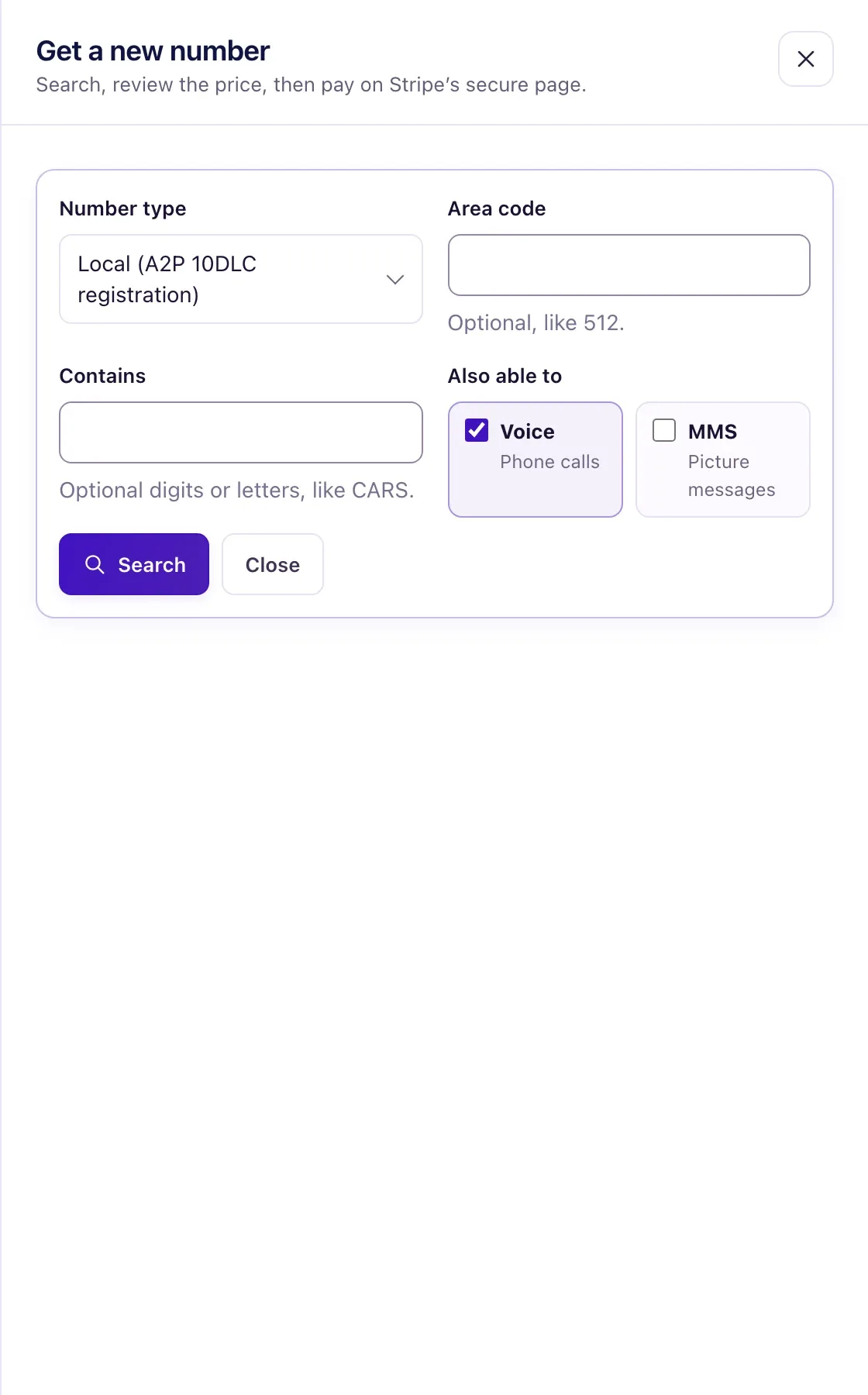
- Select Add a phone number, then choose Get a new number. The Get a new number panel opens.
- Choose the Number type: Local (needs A2P 10DLC registration) or Toll-free (needs toll-free verification). Optionally enter a 3-digit Area code or digits under Contains.
- Under Also able to, keep Voice on for phone calls and add MMS for picture messages if you need it. Select Search.
- Pick a number under Available now. It isn't reserved until it is paid for and bought.
- Review Due now, add a Label (like Sales line), then select Get this number free (your first number) or Pay $10.00 on Stripe (an extra number) and pay on the secure page.
- Back in QualiFlow, follow the purchase under Purchases until it says Provisioned. If a payment is still waiting, the purchase shows "Waiting for payment." with a Complete payment link.
- Next, register your business for texting (or ask QualiFlow to file it for you). A new number is added to your registration automatically.
- To change a number's label or location, select Edit, make the change and select Save changes. The number and its capabilities can't be changed.
- To take a number out of use, select Disable. To use it again, select Enable, then Verify number.
What the data means
The badge on the card counts your numbers, for example "2 verified · 1 pending". Each row shows the number's label, its state, the number, its Location ("(main location, default)" for the main one) and its Capabilities: SMS, MMS and Voice.
Verified means QualiFlow's carrier account holds the number and messages route to its location. Pending verification shows "Receives nothing until verified". Disabled shows "Receives nothing while disabled". Verification isn't your texting registration and doesn't record any customer's permission. A number marked Registered (verified with the carrier) was checked by QualiFlow on the carrier side and texts without QualiFlow's business registration; texts to it arrive in your Inbox and replies go out from the same number.
Due now says "Free: your first number is included in your plan.", "Free: this is an Internal workspace." or "$10.00 for the first month (extra number)". Monthly shows $10.00 per month for an extra number. When no price is set, the screen says "No price set yet". After buying, each number's card shows Free (first number), Free (Internal workspace) or $10/month · next charge and a date: after the first month, an extra number is charged with your plan on the same invoice.
A purchase moves through Payment pending, Payment confirmed, Provisioning and Checking with the carrier to Provisioned: "Number purchased — it is in your workspace. SMS stays off until registration is approved." Other states are Payment page expired, Action required, Refund in progress, Refunded, Cancelled and Failed.
Possible issues and fixes
A number stays "Pending verification"
Symptom: The number shows Pending verification, and Verify number returns a message instead of Verified.
Why: The message says why. Most often QualiFlow hasn't assigned the number to your workspace, or the carrier didn't give a clear answer.
Fix: If the message says "Try again later", select Verify number again later. If it names the QualiFlow operator, check the digits, then create a ticket in Support.
How to check: The number shows Verified with a time.
I bought a number but it isn't in the list
Symptom: You paid, or started paying, but the number isn't listed.
Why: The purchase isn't finished. Payment pending and Payment page expired mean nothing was bought or charged. Payment confirmed, Provisioning and Checking with the carrier are still working; you won't be charged twice.
Fix: Select the Complete payment link (or button) to finish paying, then I’ve paid — check now. If the page expired, select Open a new payment page. For Action required, read the note and select Choose another number or Ask for a refund. A free number has nothing to refund: select Give up this number, then pick another.
How to check: The purchase says Provisioned and the number is listed.
The payment button seems to do nothing
Symptom: You selected Pay … on Stripe but no payment page appeared.
Why: The payment page may have been blocked or closed.
Fix: Under Purchases, select the Complete payment link. It opens the same secure Stripe page.
How to check: After paying, the purchase says Payment confirmed — getting your number.
I want to remove a number
Symptom: There's no button to delete a number.
Why: Numbers can be disabled, not deleted, so their history stays.
Fix: Select Disable, then Disable number. Routing stops at once, and a paid extra number's monthly charge stops: under 30% of the paid time used, the unused part comes back; at 30% or more, nothing.
How to check: The row shows Disabled and "Receives nothing while disabled"; the card says "No monthly charge while disabled". Enabling it again needs a fresh verification and starts the charge again.
