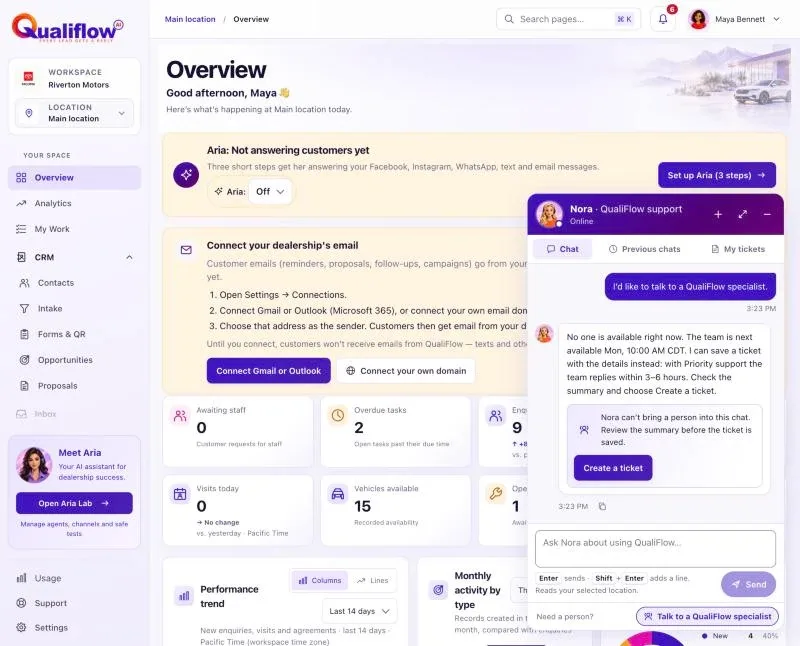
What it is
Live chat lets you talk to a QualiFlow specialist in real time, in the same window as Nora. It is part of the Priority support add-on, which also includes replies to tickets within 3–6 hours.
The support team works Monday to Friday, 10:00 to 17:00 Central time (America/Chicago, including daylight saving time) unless QualiFlow changes the hours; the Priority support card in Settings > Billing > Add-ons always shows the current hours.
How to use it
- In Nora's chat window, ask for a person, or select the person icon in the header, labelled Talk to a QualiFlow specialist.
- If a specialist is available, Nora says she is connecting you. You see your place in line and the estimated wait, counting down. You can add details while you wait, or select Leave the queue.
- When the specialist joins, you see their photo (or their initials), name, an online dot and the chat time. Messages appear both ways as they are sent, and you see when the specialist is typing.
- To show the problem, select Image and choose a JPG, PNG or WebP (up to 5 MB). Images can only be sent in a live chat, not to Nora.
- The specialist can create a ticket for you in the chat. It appears as a card with its reference (such as QF-000123) and status; select it to open it in My tickets. The ticket stays linked to the chat, so when the chat ends it's saved as a ticket and Nora can tell you that ticket's status later.
- Either of you can end the chat. Select End chat when you're done. Rate the chat from 1 to 5 stars and, if you like, add a comment, then select Send rating. When the chat ends, Nora comes back below the chat and its rating, and the window scrolls to her newest answer.
- Nora comes back in the same window: "I'm back. Anything else?"
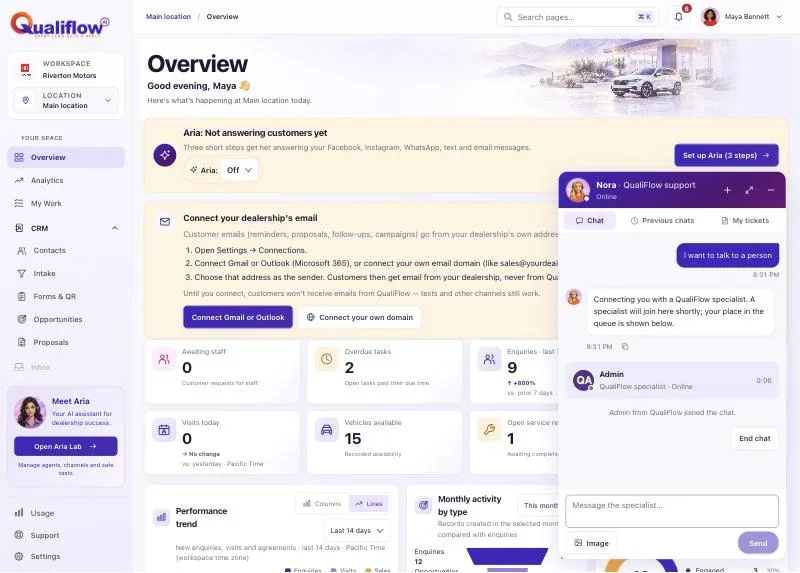
What the data means
| What you see | What it means |
|---|---|
| You're number 2 in line | Your place in the queue and the estimated wait |
| No one is available right now | It's outside the support hours, or no specialist is free. Nora offers a ticket and the next opening |
| Live chat is included with Priority support | Your workspace doesn't have Priority support. Owners can add it in Settings > Billing > Add-ons. If QualiFlow set up your plan, our team adds it: contact QualiFlow support |
| Ticket QF-000123 card | A ticket the specialist created for you in the chat |
While you're chatting with a specialist, Nora stays silent: your messages go to the specialist only. Only you and the specialist in the chat can read it, and the chat stays in Previous chats. Ask Nora "What happened with my last live chat?" or "What's the status of my ticket?" and she answers from your saved chats and tickets.
Possible issues and fixes
Nora offered a ticket instead of a live chat
Symptom: Nora says "No one is available right now" or that live chat is included with Priority support.
Why: Live chat needs Priority support, the support hours and an available specialist.
Fix: Save the ticket Nora prepared; with Priority support the team replies within 3–6 hours. Owners can add Priority support in Settings > Billing > Add-ons; if QualiFlow set up your plan, the add-on buttons are off and our team adds it, so contact QualiFlow support. Staff: ask your Owner.
How to check: My tickets shows the new reference.
Nobody joined
Symptom: You waited and no specialist joined.
Why: Every specialist was busy.
Fix: Nothing to do: after a while the chat is saved as a ticket automatically, and the chat says so.
How to check: A ticket card appears in the chat and in My tickets.