
What it is
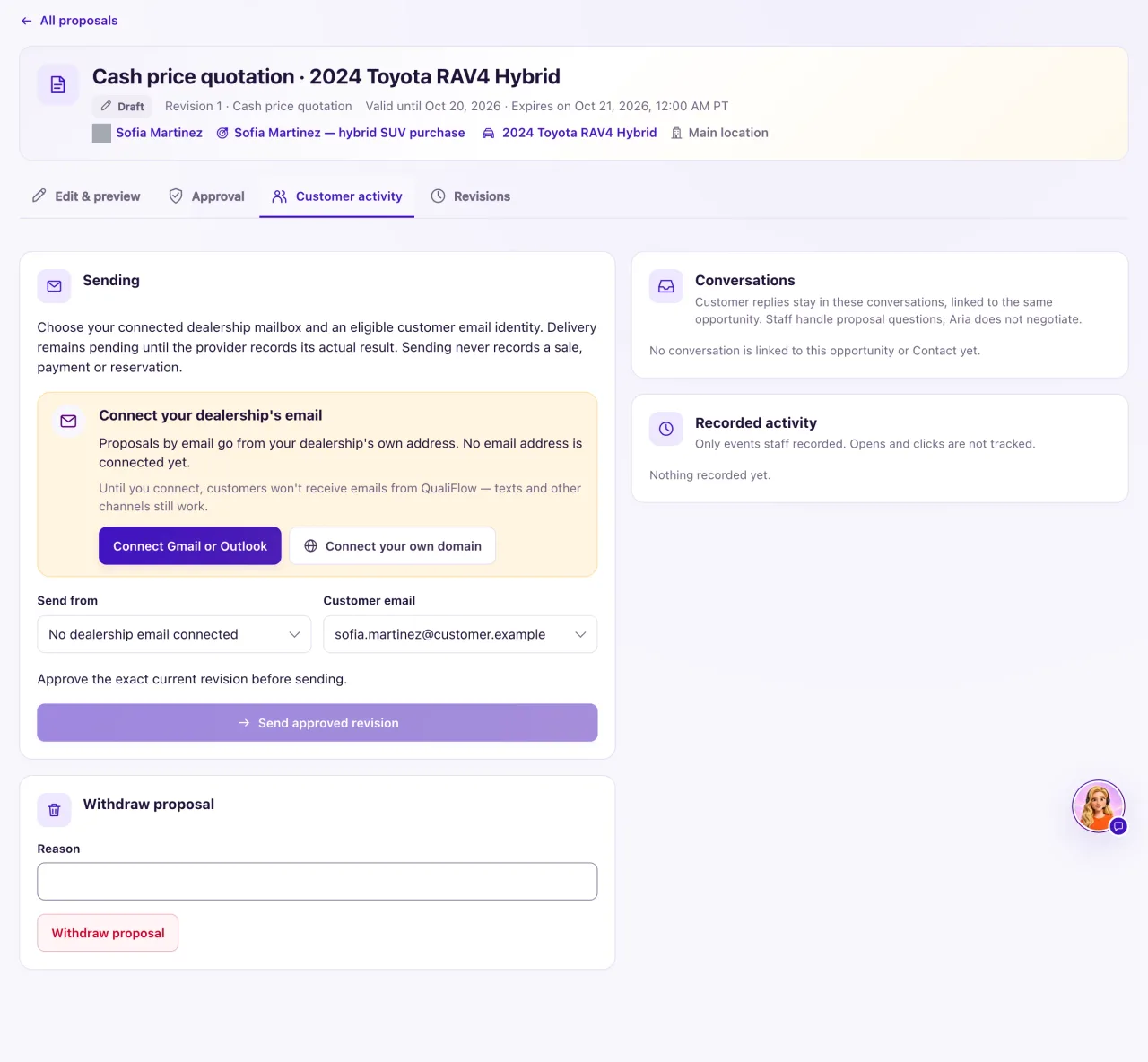
The Customer activity tab of a proposal is where the approved revision leaves the dealership and where your team records what the customer did. Proposals are emailed only from your own connected mailbox or verified domain address, never from a QualiFlow address. You can also record a hand-over in person or on paper, with no email at all.
How to use it
- Open the approved proposal and select Customer activity.
- Under Sending, choose Send from (your mailbox or domain address) and the Customer email.
- Select Send approved revision, then Queue approved proposal. When your email provider confirms it was sent, the proposal shows Shared (recorded) by itself.
- Handed it over instead? Use Record that revision N was shared, choose In person, Printed copy handed over or Other recorded method, and select Record as shared. This sends nothing.
- When the customer reacts, use Record a customer response: choose what happened (viewed, a question, a counteroffer, accepted or declined), how and when, and the evidence.
- After a question or counteroffer, select Create follow-up task to assign it to a person. Aria does not negotiate proposals.
- To take an offer off the table, select Withdraw proposal and give a Reason. It stays on record.
What the data means
Sending works only for the approved current revision while it has not expired. The customer's email address must be on their Contact, with recorded permission for follow-up on their inquiry. Each send shows its state and, when it was not sent, the reason in plain words.
Recorded activity lists only events your team recorded. Opens and clicks are not tracked. Sending never records a sale, payment or reservation, and Accepted (recorded) is not a payment, finance approval or sale: record the sale on the opportunity.
When a customer replies by email to the proposal with a question or counteroffer, it is recorded on the proposal and a My Work task asks a person to review it.
Possible issues and fixes
The Sending panel says "No dealership email connected"
Symptom: Send from is empty and the Connect your dealership's email card shows.
Why: No mailbox or verified domain address is connected. Proposals leave only from your dealership's own address.
Fix: An Owner connects Gmail or Outlook in Settings → Connections, or verifies an email domain, then reloads the proposal. Meanwhile, record a hand-over.
How to check: Send from lists your address.
Sending is refused: no captured permission for proposal follow-up
Symptom: "This recipient does not have current captured permission for proposal follow-up."
Why: An email address alone is not permission. The Contact needs a current permission for follow-up on their inquiry, with its captured disclosure filled in, not revoked, disputed or expired.
Fix: On the Contact choose Permission & outreach preferences → Record permission: channel Email, that address, purpose Follow-up on their inquiry, the basis and evidence, and tick Include captured disclosure and affirmative permission with its boxes filled in.
How to check: The send is queued.
Send approved revision is greyed out
Symptom: You can't select Send approved revision.
Why: No Send from or Customer email is chosen, the current revision isn't approved or has expired, it was already queued or sent to that address, or an earlier send has an unknown result.
Fix: Choose both boxes and approve the current revision. For an unknown result select Check again and check with the customer before sending a second time.
How to check: The button is enabled and the send is queued.
The send shows "Not sent" with a reason
Symptom: The delivery line under the button says the proposal was not sent.
Why: The approved content, sender or recipient changed after it was queued, the mailbox needs to be authorized again, the address bounced, or the mail server could not be reached.
Fix: Approve the current revision again, reconnect the mailbox in Settings → Connections, or correct the address. If the provider did not confirm, check with the customer before sending again.
How to check: A new send shows Shared (recorded).
Recording what the customer said is refused
Symptom: "Acceptance can only be recorded for a shared proposal that is still open." or "Record the evidence for this response."
Why: A response must fit the proposal's state: share it first, record only past times, and fill in the evidence and who accepted.
Fix: Share or hand over the current revision, then record the response with its evidence.
How to check: The response appears under Recorded activity.
