
What it is
Every text you or Aria send shows its state beside its time in the Inbox, next to the sender's name (or at the end of the message when it follows another from the same sender). A text that didn't reach the customer says Not sent, Failed or Outcome unknown. Point at the label to read the reason.
Not sent means QualiFlow stopped it before it reached the phone provider. Failed means the provider or the customer's carrier refused it. In both cases the customer did not receive it.
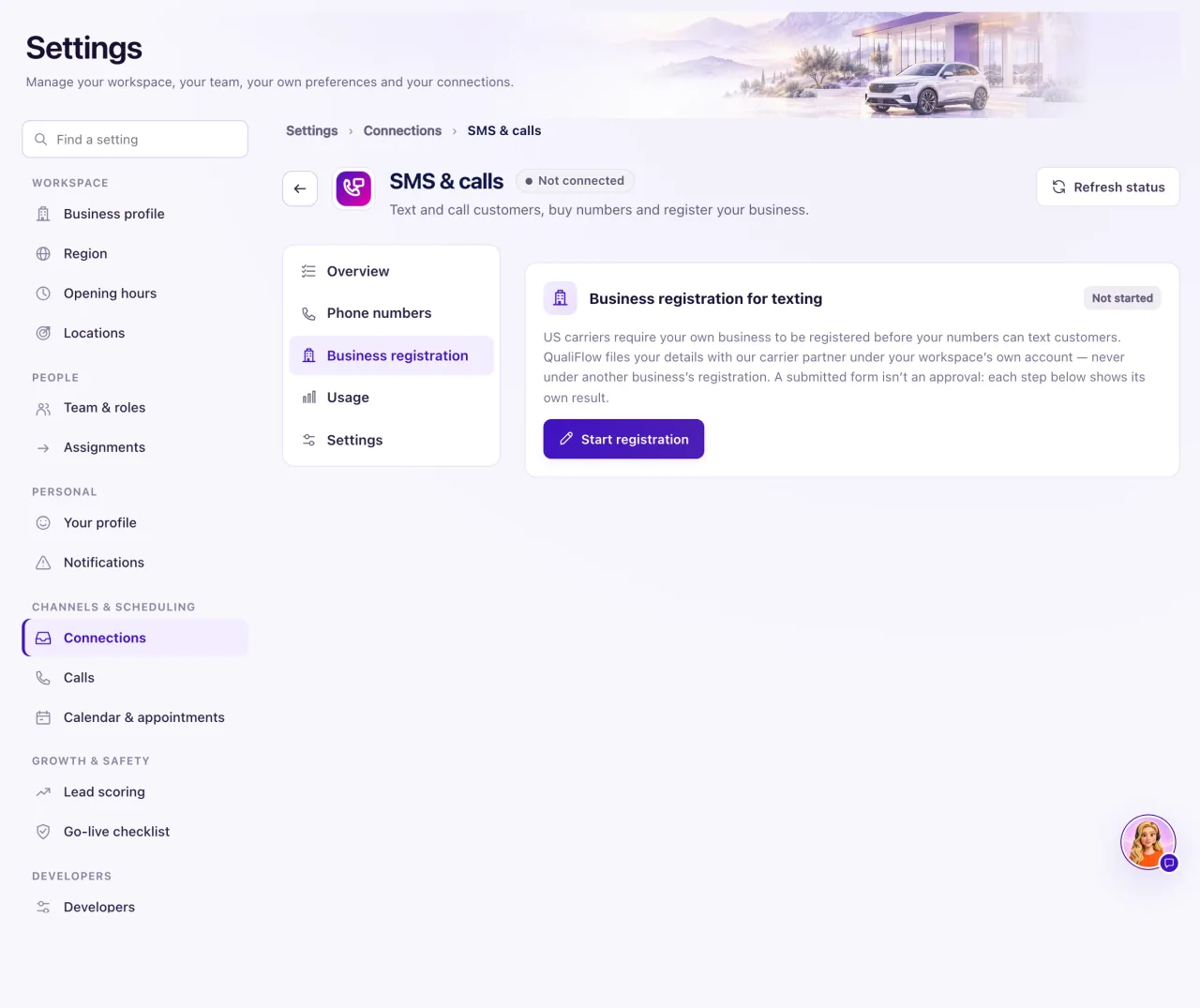
The most common reason is that texting waits for carrier approval. Until US carriers approve your business, QualiFlow holds the texts you and Aria send from your dealership number. Calls and incoming texts work right away.
How to use it
- In the Inbox, point at the label at the end of the text and read the reason.
- If the conversation shows the Texts aren't sent yet chip under the customer's name, or the same words in the line above the reply box, texting waits for carrier approval. Select the chip (or Why?), then Open business details.
- An Owner opens Settings → Connections → SMS & calls → Business registration and selects Add business details (or Finish, Review or Fix business details).
- Complete the steps and select Submit for registration.
- Wait for approval. It usually takes a few days and can take up to 3 weeks. Business registration shows each step's result.
- Once texting is approved, send the text again. Held texts aren't sent later by themselves.
- For any other reason, follow the matching problem below.
What the data means
| Label | What it means |
|---|---|
| Not sent | QualiFlow stopped it before it reached the phone provider. The customer did not receive it |
| Failed | The provider or the customer's carrier refused it. The reason follows "Not delivered:" |
| Outcome unknown | The send result was not confirmed. Check before sending again, to avoid a duplicate |
| Delivered | It reached the customer's phone. Text messages never report whether they were read |
Registration never gives you permission to text anyone. Customers must still agree to receive texts.
Possible issues and fixes
Texts show Not sent and the conversation says "Texts aren't sent yet"
Symptom: The text shows Not sent: "texting starts after your business is approved by US carriers. Calls and incoming texts work now."
Why: US carriers haven't approved your business registration yet, so QualiFlow holds outgoing texts from your number.
Fix: An Owner selects Open business details, completes the business details and selects Submit for registration. Then wait for approval. A Staff member asks their Owner.
How to check: In Settings → Go-live checklist, the Text messages (SMS) row shows Ready, and a new text shows Delivered.
A text Failed because the customer replied STOP
Symptom: The text shows Failed: "the customer replied STOP to this number".
Why: The customer opted out. A text STOP stops texts to that number only; calls and email continue unless the customer asks not to be called.
Fix: Don't text them. Service messages continue by email when the customer has an email address. Call or email them if you need to reach them.
How to check: The contact shows "Texts stopped by the customer — service messages continue by email."
A text Failed because the carrier blocked or filtered it
Symptom: The text shows Failed with "the carrier filtered it as possible spam", "the customer's carrier blocked it", or "US carriers only carry texts from this number after your business is approved".
Why: The customer's carrier refused the message, because of its wording or because your business registration isn't approved.
Fix: Check the business registration first. Then review the wording of the message. If it keeps happening, create a support ticket with the reason shown.
How to check: The next text shows Delivered.
A text Failed because the number can't receive texts
Symptom: The text shows Failed with "the number can't receive text messages", "the phone is unreachable or switched off" or "the number is unknown or no longer in service".
Why: The customer's number is a landline, is switched off, or no longer works.
Fix: Call the customer, or ask for a mobile number and update the contact.
How to check: A text to the new number shows Delivered.
The reply says "SMS sending is not set up yet"
Symptom: A text isn't sent and the Inbox says "SMS sending is not set up yet, so nothing was sent. Your draft is kept."
Why: There is no verified texting number for this conversation's location.
Fix: An Owner opens Settings → Connections → SMS & calls → Phone numbers. Check that a number shows Verified and that its Location is this conversation's location.
How to check: Send the draft again. It shows Sent or Delivered.
A text shows Outcome unknown
Symptom: The text shows Outcome unknown.
Why: QualiFlow couldn't confirm whether the provider sent it.
Fix: Ask the customer whether they received it before you send it again, so they don't get it twice.
How to check: The label changes when the provider reports a result.
