
What it is
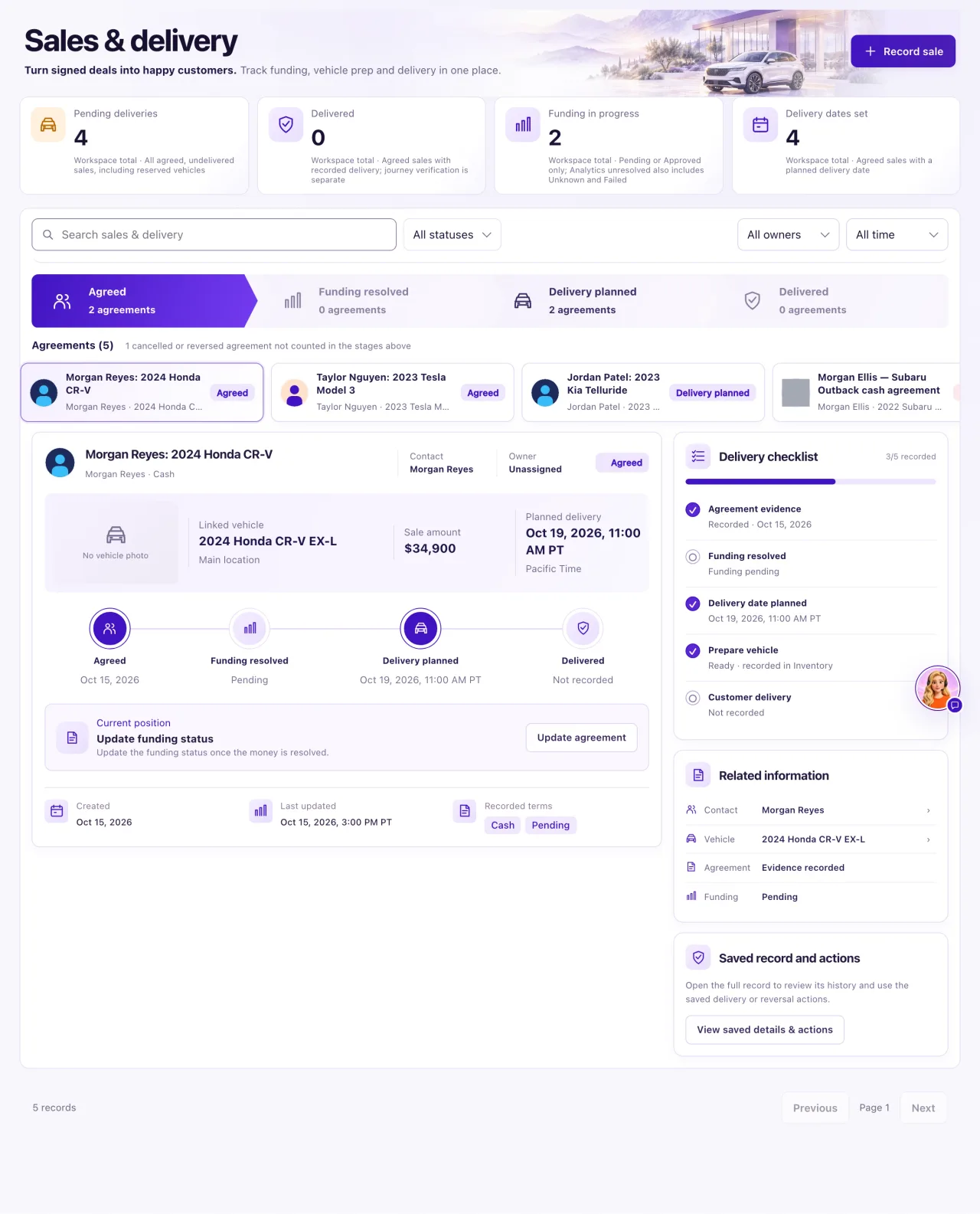
Sales & delivery records each sale as three separate facts: the agreement, the funding and the physical delivery. It shows where every agreed sale stands and what to do next, and it holds the car in stock while the deal is open.
Only a signed-in Owner can record a sale, a delivery or a stock status. Staff with Sales & delivery access can read everything except the vehicle itself while Inventory is Owner-only for Staff: they see "Vehicle details are Owner only" instead of the car. Aria never records a sale.
How to use it
- Open the opportunity and select Record sale (or Record sale on Sales & delivery). The customer, opportunity and vehicle are filled in.
- Choose the Purchase type (Cash, Finance or Lease), the Sale agreement date, Dealership / location, Timezone and Funding. The form starts filled in: a title from the customer and vehicle, your workspace currency, and the location you have selected offered as the choice.
- Enter the Agreed sale amount with its Sale currency, the Planned delivery and the Sale agreement evidence. For finance or a lease, add the lender and agreement dates.
- Fill in Source & evidence. Choose Verified with evidence if you want the pre-delivery welcome message to go out. Select Record sale.
- As the deal moves, select Edit sale to update Funding with its Funding source/reference, and mark the car Ready in Inventory once it is prepared.
- After the handover, open the sale and select Record delivery. Enter the Actual effective date and the Evidence and reason, set Source to Verified so the ownership check-ins can start, and save.
What the data means
| Stage | When a sale is in it |
|---|---|
| Agreed | Funding is not resolved yet |
| Funding resolved | Funded, or Not applicable for a cash sale (so cash gets here at once) |
| Delivery planned | Funding resolved and a planned delivery date is set |
| Delivered | A delivery is recorded |
Selecting a stage selects the first agreement in it; it does not filter the list (use the status list, Sale owner and Sale period). The cards are workspace totals: Pending deliveries (agreed sales not delivered yet), Delivered, Funding in progress (Pending or Approved) and Delivery dates set.
While a sale is open the car shows Sale pending / Reserved (funding not resolved), then Sold · Awaiting delivery, then Sold · Delivered. Nobody can pick Reserved by hand, and Approved funding is not receipt of funds. The checklist step Prepare vehicle is read from the car's Physical readiness in Inventory.
Possible issues and fixes
I can't record a sale
Symptom: Record sale refuses with a message, or the opportunity is not in the list.
Why: Only open opportunities take a sale, one agreed sale can hold a car, and a car under availability review, archived or with a disputed ownership can't be sold. Approved, Funded or Failed funding needs a reference, and Not applicable is for cash only.
Fix: Follow the message: create a new opportunity, cancel the other sale, use Confirm availability on the car in Inventory, or fill in Funding source/reference.
How to check: "Record saved." and the opportunity shows Won.
The car says Sale pending / Reserved and I can't change it
Symptom: The car's availability can't be edited in Inventory.
Why: The sale sets it. It changes to Sold · Awaiting delivery when funding is Funded (cash counts at once) and Sold · Delivered after delivery.
Fix: Open the sale, select Edit sale and update Funding when the money has really arrived.
How to check: The sale's stage and the car's label change.
Record delivery is refused
Symptom: A message such as "Record delivery after the handover; the actual delivery date cannot be in the future."
Why: The delivery date can't be in the future or before the agreement. The sale must still be agreed, and the car can't have another current ownership.
Fix: Correct Actual effective date, fill in Evidence and reason, or end the previous ownership in Ownership.
How to check: An Ownership record appears and the car shows Sold · Delivered.
The checklist says Prepare vehicle is not ready
Symptom: "Not ready · mark it Ready in Inventory once prepared" or "Not recorded".
Why: The step reads Physical readiness in Inventory, not the sale. Staff see it as managed by an Owner.
Fix: An Owner opens the car in Inventory and sets Physical readiness to Ready.
How to check: The step reads "Ready · recorded in Inventory".
The pre-delivery or post-delivery message never went out
Symptom: The customer got no welcome before delivery or check-in after it.
Why: Most often Source was left on Staff-recorded. The sale also needs a Planned delivery and agreement evidence, the welcome goes 1 day before the planned delivery, and the customer needs a conversation and consent.
Fix: Open the sale or ownership, select Edit, set Source to Verified with evidence, and save. To congratulate the customer now, message them from the Inbox.
How to check: The customer shows in the journey's Activity tab on Journeys.
